Introduction to KookaCode
KookaCode: MicroPython Programming Editor for Kookaberry Microprocessor Boards
KookaCode is a powerful editor designed for creating program scripts for Kookaberry and related microprocessor boards.
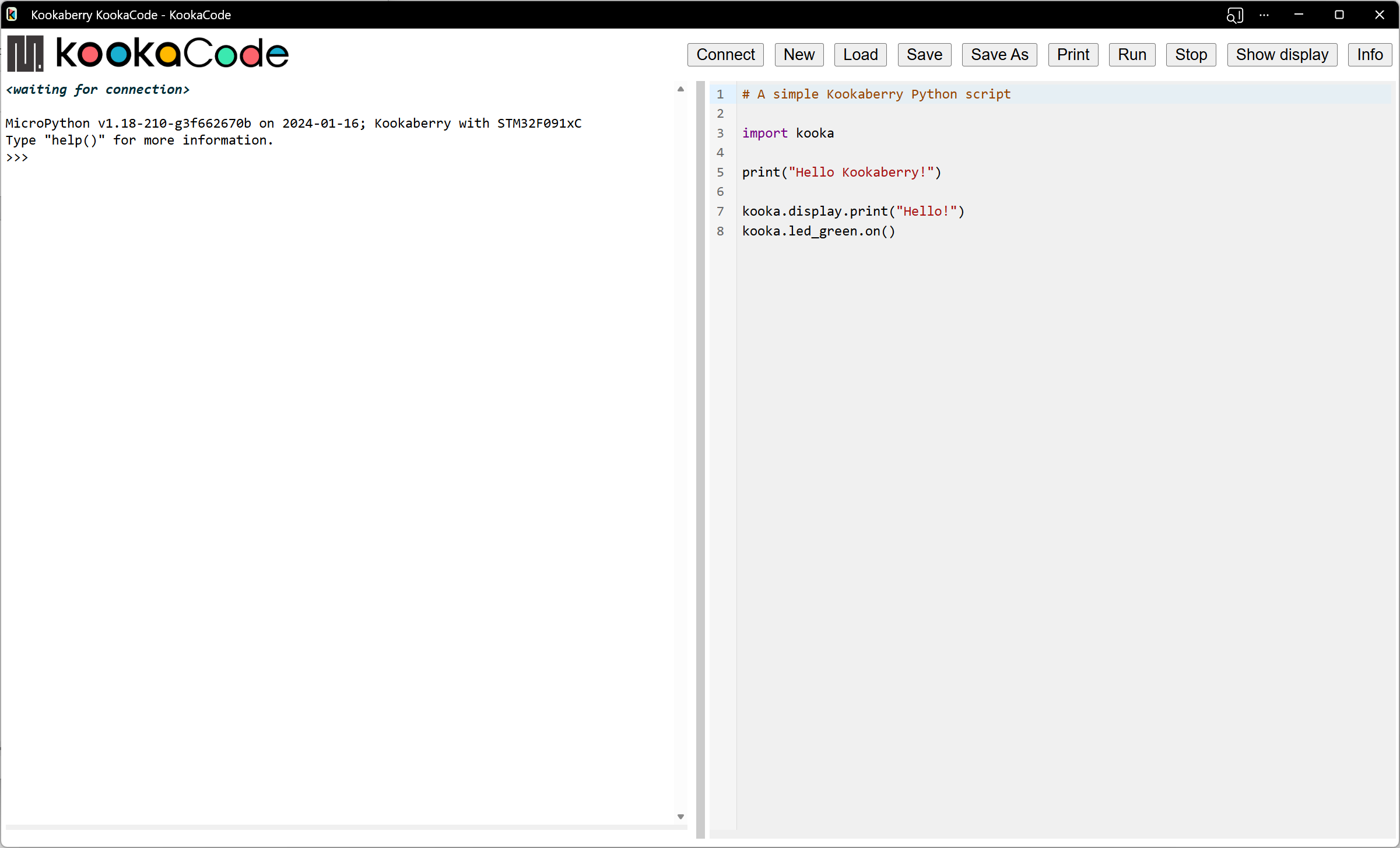
Fig. 1 This is the KookaCode display with an example MicroPython script.
The example shown above is a simple script that shows Hello Kookaberry on the Kookaberry display, prints Hello on the console,
and lights the Kookaberry’s green LED.
KookaCode was created by Damien George (George Robotics – MicroPython) in collaboration with Kookaberry Pty Ltd. It also received support from the AustSTEM Foundation, the Warren Centre, and the Vonwiller Foundation.
Key Features
- Comprehensive User Interface:
KookaCode is an Integrated Development Environment (IDE). Users can create MicroPython scripts and run them on a Kookaberry without needing to compile, upload and flash binary files. The script editor includes Python auto-complete functionality, aiding the creation of syntactically correct MicroPython scripts. Includes the Kookaberry’s console interface so users can directly inspect, monitor, debug and control the Kookaberry. The Kookaberry display can be viewed on the PC’s display facilitating sharing for educational and documentation purposes.
- Compatibility:
The generated code can be utilized on most microprocessor boards that use MicroPython, but is particularly suited to those with Kookaberry firmware for STM, RP2040 and RP2350 microprocessors.
- Platform Compatibility:
KookaCode runs as a Progressive Web Application (PWA) within the Google Chrome we browser and browsers that are based on Chrome. Any personal computer that supports the Chrome web browser can be used. This includes PCs running Microsoft Windows 10 or 11, Apple MacOS, Linux, Chrome OS (Chromebook), and Raspberry Pi Raspbian operating systems.
- Easy Access:
The latest version of KookaCode can be conveniently downloaded from the AustSTEM website at https://auststem.com.au/KookaCode.
Follow the Access and Install KookaCode guide in the next section to initiate and, for offline use, to install KookaCode.
Programming the Kookaberry With KookaCode
Using KookaCode is straight forward and enjoyable.
Users can load, cut and paste, and directly edit MicroPython code in the Workspace. Code elements are coloured to emphasise MicroPython syntax elements.
The Kookaberry Reference Guide provides a comprehensive guide to using the Kookaberry and programming it using MicroPython.
With KookaCode, programming becomes an enjoyable, productive and accessible endeavour.
AustSTEM Learning Hub
AustSTEM has assembled a collection of resources on its Learning Hub at https://learn.auststem.com.au. These resources complement the material in this manual with examples, lesson plans, descriptions of equipment and of their application.